

Cyber Essentials v3.3 and the SRA: What the April 2026 Update Means for Your Law Firm
In April 2026, the National Cyber Security Centre (NCSC) published version 3.3 of the Cyber Essentials Requirements for IT Infrastructure. On the surface, it’s just an incremental update. However, for law firms regulated by the Solicitors Regulation Authority (SRA), it quietly raises the bar in ways that matter — particularly around cloud services, multi-factor authentication (MFA) and the security of the platforms your fee earners log into every day.
In this article, we explain what has changed, why the SRA cares, and how to balance the genuine cost of tighter security — including time lost to extra login steps — against the very real risk of client money fraud.
Why the SRA cares about Cyber Essentials
Cyber Essentials is not, strictly speaking, an SRA requirement. There is no rule that says a law firm must hold the certification. But without the controls Cyber Essentials describes in place, delivering against the SRA’s Standards and Regulations is almost impossible to achieve.
The Code of Conduct for Firms is clear that a firm must “identify, monitor and manage all material risks to your business” (paragraph 2.5). And the SRA hasn’t left much room for doubt about whether cybercrime counts: it’s been flagging it as exactly that kind of material risk in its Risk Outlook reports for years. In other words, this isn’t a new expectation that’s caught anyone off guard — it’s a long-standing one that the move to the cloud has simply made more pressing.
If client money or confidential information is lost, paragraph 3.5 requires you to be honest and open with the client, put matters right where possible, and explain fully and promptly what happened. Paragraph 3.9 requires you to report serious breaches to the SRA without delay.
Add the SRA Accounts Rules duty to protect client money and your professional obligations around confidentiality, and the picture is clear: a cyber incident in a law firm is rarely just an IT problem… it’s a regulatory event.
The SRA itself points firms towards Cyber Essentials and Cyber Essentials Plus as the practical baseline, and an increasing number of professional indemnity insurers, lender panels and commercial clients now ask about certification status at renewal or onboarding. For many firms, the question is no longer whether to align with Cyber Essentials, but how quickly.
What’s actually new in v3.3
Version 3.3 makes several changes that land squarely on the way modern law firms work:
- Cloud services can no longer be excluded from scope. If your practice management system, case management, email, document storage or digital dictation lives in the cloud — and for most firms it now does — those services must be inside your Cyber Essentials assessment. The new version provides a clear definition of a cloud service and a definitive statement that exclusion is not permitted.
- MFA on cloud services is mandatory. Authentication to cloud services must always use multi-factor authentication. For a law firm, that means Microsoft 365, your case management platform, your legal accounts package and anything else holding organisational data.
- Passwordless authentication is formally recognised. The definition now explicitly includes FIDO2 authenticators and passkeys, which are treated as MFA in their own right. This matters because passwordless is often faster than typing a password — more on that below.
- Software development gets a framework. The Software Security Code of Practice is referenced for firms developing their own applications or client portals.
- Backups are emphasised. Backing up remains outside the technical controls, but the guidance now stresses its importance far more strongly — sensible advice for any firm that has watched a peer go through a ransomware event.
The five technical controls themselves are unchanged: firewalls, secure configuration, security update management, user access control and malware protection. Notable ongoing requirements include applying high-risk security updates within 14 days of release, removing unsupported software, and using separate accounts for administrative work.
The law firm threat that makes this real: payment diversion fraud
If you want a single reason to take this seriously, look no further than Conveyancing Fraud. Often called “Friday afternoon fraud” by the profession, it makes up 75% of cybercrime reports.
The pattern is depressingly consistent; a criminal compromises a mailbox — usually via a phishing email and a password that wasn’t protected by MFA. They sit quietly inside the account, sometimes for weeks, reading correspondence on live conveyancing matters. Then, close to completion (often on a Friday, when completions cluster and detection is slowest), they email the buyer impersonating the firm, or email the firm impersonating the client, with “updated” bank details.
The money moves and is laundered through mule accounts within hours.
Unfortunately, recovery rarely succeeds.
The SRA has reported losses of millions of pounds a year to email modification fraud, with conveyancing amongst the most common targets. Individual incidents have seen six-figure sums — in some reported cases around £500,000 — cleared from client accounts.
And consequences don’t just stop at lost money: solicitors have been fined by the Solicitors Disciplinary Tribunal (SDT) for how they handled fraudulent payment instructions, insurers scrutinise the firm’s controls before paying out, and the reputational damage with lender panels and clients can outlast the financial loss.
Almost every one of these attacks begins with a compromised account. And the single most effective control against account compromise — the control v3.3 now makes non-negotiable for cloud services — is MFA.
“But MFA slows everyone down” — the honest cost conversation
Let’s be transparent, because this is the objection we hear most often from managing partners: extra authentication steps cost time, and time is literally what a law firm sells.
So, let’s count it properly.
Cost comparison chart: projected costs of not adopting MFA vs implementing tighter security for UK law firms, 2024 to 2028
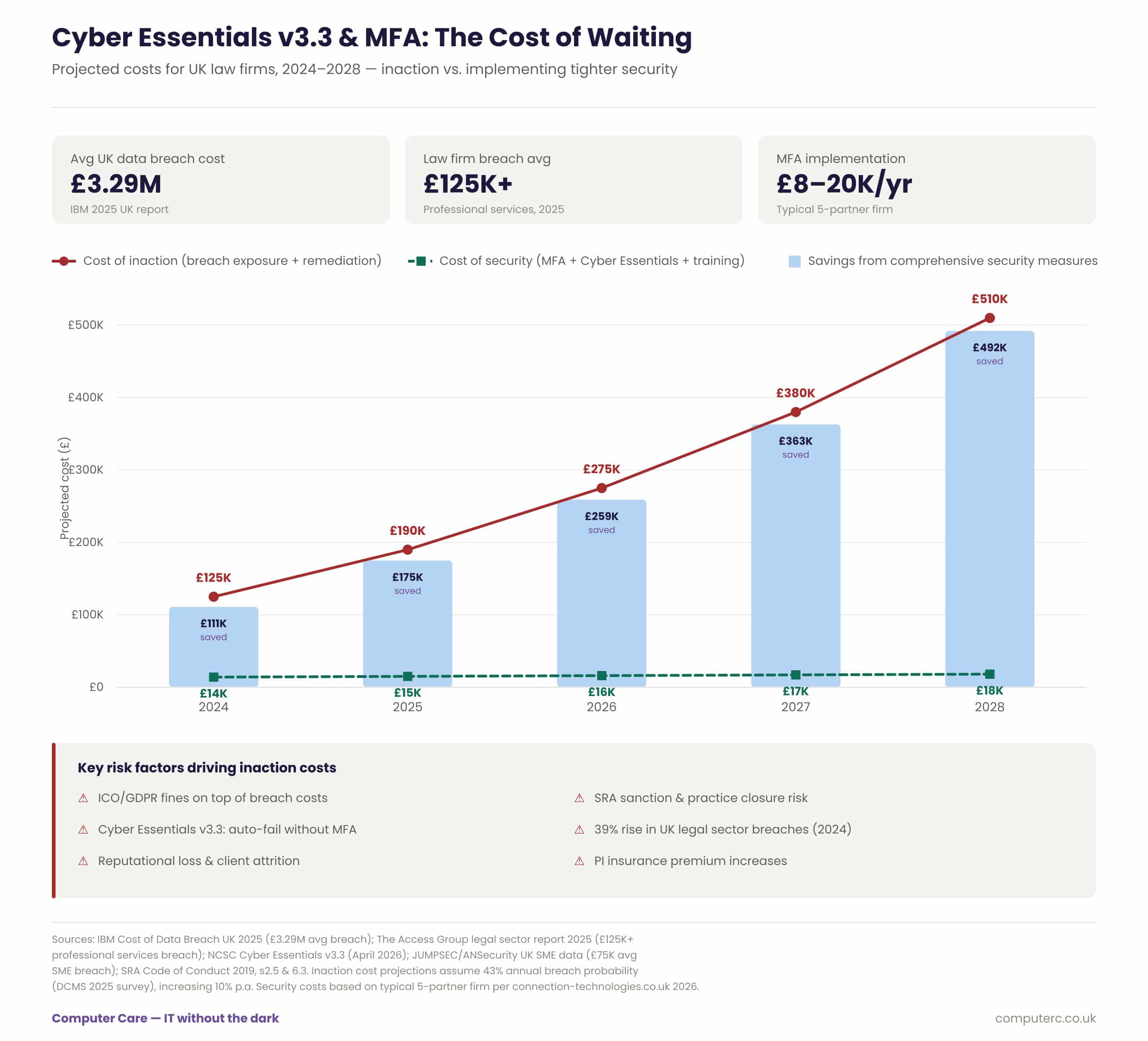
The numbers tell a striking story: for a typical UK law firm, the cost of doing nothing about MFA and cloud security is already painful — around £125,000 on average for a single breach in 2024 — and it gets significantly worse over time, with projected exposure climbing past £500,000 by 2028 as attacks on the legal sector grow more frequent and sophisticated. By contrast, getting properly secured with MFA, Cyber Essentials Plus, and basic staff training costs somewhere in the region of £14,000–£18,000 a year — a fraction of the risk. That gap between the two lines is where the real argument lives: by 2028, a firm that invests in tighter security could avoid over £490,000 in breach-related costs, representing roughly a 28-to-1 return on what they spend on security. And with Cyber Essentials v3.3 now making MFA a hard pass/fail requirement from April 2026, and the SRA treating these controls as non-discretionary obligations under its Code of Conduct, this is no longer just a sensible investment — for law firms handling confidential client data, it’s fast becoming a regulatory necessity.
Microsoft’s own research has consistently found that MFA blocks the overwhelming majority of automated account compromise attacks. There are very few controls anywhere in business with that ratio of cost to risk reduction.
Where to start
Cyber Essentials v3.3 is, in our view, the most law-firm-relevant version of the scheme yet, precisely because it follows the data into the cloud, where the client money risk actually lives. The firms that handle this well treat it not as an IT certification exercise but as a client care decision: the controls exist to protect the money and confidences your clients have trusted you with.
The ten-point checklist below is where we suggest you begin. And if your current IT provider can’t clearly explain your firm’s position against each point — or can’t show you their own Cyber Essentials certificate — that tells you something too.
10-Point Checklist: Preparing Your Firm for Cyber Essentials v3.3
- Map your cloud estate. List every cloud service holding firm or client data — email, case management, legal accounts, document storage, dictation, payroll, e-signature. Under v3.3, all of it is in scope. You cannot secure what you haven’t listed.
- Switch on MFA everywhere, starting with email. Mailbox compromise is the front door to payment diversion fraud. Enforce MFA on Microsoft 365 (or equivalent) for every user — including partners — then extend it to every other cloud service. No exceptions for seniority.
- Reduce login friction while you do it. Deploy single sign-on so one secure login covers multiple platforms, and pilot passwordless authentication (passkeys/FIDO2, Windows Hello). Done well, security gets faster, not slower.
- Lock down administrative accounts. Separate admin accounts from day-to-day accounts — no email or browsing on accounts with admin credentials — and protect them with MFA. Ask your IT provider to evidence this for their own access to your systems too.
- Get patching onto a 14-day footing. High-risk and critical updates (CVSS 7+) must be applied within 14 days of release across servers, laptops, mobiles, firewalls and routers. Identify and retire any unsupported software — old practice management systems are a common offender, firewalls that aren’t being actively managed too.
- Review firewalls and remote access. Change default passwords, block unauthenticated inbound connections, document the business need for every inbound rule (there should be none really), and ensure home workers are covered by software firewalls and use a corporate grade VPN or SASE solution.
- Bring BYOD under control. Any personal device accessing firm email or documents is in scope. Use mobile device management or app protection policies, and set minimum standards (PIN/biometric lock, supported OS) before access is granted.
- Harden your payment processes against fraud. Publish your bank details once, in the engagement letter, with a written warning that they will never change by email. Verify any change of payee details verbally on a known number. Brief all staff on Friday-afternoon and completion-day risk.
- Fix passwords and accounts housekeeping. Minimum 12-character passwords (or 8 with deny-list blocking), no forced expiry, a password manager for staff, and a leavers process that disables accounts immediately — including third-party and supplier accounts.
- Back up, test and document. Implement automatic backups with at least one copy isolated from your network, test a restore, and document your incident response plan — including how and when you would notify the SRA and the ICO. Then book your Cyber Essentials assessment.